Your first MCP App
- Spec
2026-07-28- Evidence
- E2Reproducedarm64
- MCP Apps SDK
@modelcontextprotocol/ext-apps@2.0.4- TypeScript SDK (server)
@modelcontextprotocol/server@2.4.0- TypeScript SDK v2 (Node HTTP)
@modelcontextprotocol/node@2.1.2- MCP Inspector
@modelcontextprotocol/inspector@2.12.0- Verified
A normal tool returns text and data. An MCP App also returns a small web page, called a View, that the host shows in the conversation. The user can click it, and the View can call your tools again.
MCP Apps is an official extension of MCP, identified as io.modelcontextprotocol/ui. Its stable spec is dated 2026-01-26. This guide builds a dice roller: a tool roll_dice and a View that shows the result and has a Roll again button.
How the pieces fit
Section titled “How the pieces fit”- The server registers a tool whose
_meta.ui.resourceUripoints at aui://URI. - The server registers a resource at that URI. Its content is one HTML document with MIME type
text/html;profile=mcp-app. - When the model calls the tool, a host that supports MCP Apps reads the resource and renders it in a sandboxed iframe.
- The host sends the tool result to the View. The View can call tools on the same server through the host.
A host without MCP Apps support ignores the UI and shows the tool’s normal text result, so always return useful content.
Set up the project
Section titled “Set up the project”mkdir dice-app && cd dice-appnpm init -y && npm pkg set type=modulenpm install --save-exact @modelcontextprotocol/ext-apps@2.0.4 @modelcontextprotocol/server@2.4.0 \ @modelcontextprotocol/node@2.1.2 zod@4.6.7npm install --save-exact --save-dev vite@6.4.5 vite-plugin-singlefile@2.3.4The host loads the View from a single HTML string, so its scripts and styles must be inside that one file. Vite with vite-plugin-singlefile bundles them; this is also what the official quickstart uses. The SDK is @modelcontextprotocol/ext-apps@2.0.4.
The View
Section titled “The View”<!doctype html><html lang="en"> <head> <meta charset="utf-8" /> <title>Dice</title> <style> body { font-family: system-ui, sans-serif; margin: 1rem; } output { display: block; font-size: 3rem; font-weight: 700; margin: 0.5rem 0; } </style> </head> <body> <p>Rolled a <span id="sides">?</span>-sided die:</p> <output id="value">…</output> <button id="again">Roll again</button> <script type="module" src="/src/mcp-app.ts"></script> </body></html>import { App } from '@modelcontextprotocol/ext-apps';
const valueEl = document.getElementById('value')!;const sidesEl = document.getElementById('sides')!;let sides = 6;
function show(result: { structuredContent?: Record<string, unknown> }) { const roll = result.structuredContent as { sides: number; value: number } | undefined; if (!roll) return; sides = roll.sides; sidesEl.textContent = String(roll.sides); valueEl.textContent = String(roll.value);}
const app = new App({ name: 'Dice View', version: '1.0.0' });
// Set handlers before connect(), or the first tool result can arrive before anyone listens.app.ontoolresult = show;
document.getElementById('again')!.addEventListener('click', async () => { // The View calls the server's tool through the host. show(await app.callServerTool({ name: 'roll_dice', arguments: { sides } }));});
app.connect();new App(...)andapp.connect()open the channel to the host (JSON-RPC overpostMessage).- Set
app.ontoolresultbeforeconnect(). The host may deliver the first result right away. app.callServerTool(...)asks the host to call a tool on your server. The host decides whether to allow it.
import { defineConfig } from 'vite';import { viteSingleFile } from 'vite-plugin-singlefile';
// Hosts render the View from one HTML string, so scripts and styles are inlined into dist/mcp-app.html.export default defineConfig({ plugins: [viteSingleFile()], build: { rollupOptions: { input: 'mcp-app.html' }, outDir: 'dist', emptyOutDir: true },});npx vite buildExpecteddist/mcp-app.html, about 240 kB with the SDK inlined.
The server
Section titled “The server”import { readFile } from 'node:fs/promises';import { createServer } from 'node:http';import { registerAppResource, registerAppTool, RESOURCE_MIME_TYPE } from '@modelcontextprotocol/ext-apps/server';import { localhostHostValidation, localhostOriginValidation, toNodeHandler } from '@modelcontextprotocol/node';import { createMcpHandler, McpServer } from '@modelcontextprotocol/server';import * as z from 'zod';
// The tool and the resource are tied together by this URI.const viewUri = 'ui://dice/mcp-app.html';
function buildServer() { const server = new McpServer({ name: 'dice-app', version: '1.0.0' });
registerAppTool( server, 'roll_dice', { title: 'Roll a die', description: 'Roll a die with the given number of sides and show the result.', inputSchema: z.object({ sides: z.number().int().min(2).max(100).default(6) }), outputSchema: z.object({ sides: z.number(), value: z.number() }), _meta: { ui: { resourceUri: viewUri } }, }, async ({ sides }) => { const output = { sides, value: 1 + Math.floor(Math.random() * sides) }; // Hosts without MCP Apps support still get a useful text answer. return { content: [{ type: 'text', text: `Rolled ${output.value} on a d${sides}.` }], structuredContent: output }; }, );
registerAppResource(server, 'Dice view', viewUri, { mimeType: RESOURCE_MIME_TYPE }, async () => ({ contents: [ { uri: viewUri, mimeType: RESOURCE_MIME_TYPE, text: await readFile(new URL('./dist/mcp-app.html', import.meta.url), 'utf8'), }, ], }));
return server;}
const handler = toNodeHandler(createMcpHandler(buildServer));const validateHost = localhostHostValidation();const validateOrigin = localhostOriginValidation();const port = Number(process.env.PORT ?? 3001);
createServer((req, res) => { if (!validateHost(req, res) || !validateOrigin(req, res)) return; // A host that runs in a browser tab (such as basic-host) calls this server cross-origin. // The Origin was checked above, so it is a localhost page and can be echoed back. if (req.headers.origin) { res.setHeader('Access-Control-Allow-Origin', req.headers.origin); res.setHeader('Vary', 'Origin'); res.setHeader('Access-Control-Expose-Headers', 'Mcp-Session-Id, MCP-Protocol-Version'); } if (req.method === 'OPTIONS') { res.writeHead(204, { 'Access-Control-Allow-Methods': 'POST, GET, DELETE, OPTIONS', 'Access-Control-Allow-Headers': req.headers['access-control-request-headers'] ?? '*', }); res.end(); return; } if (new URL(req.url ?? '/', 'http://localhost').pathname !== '/mcp') { res.writeHead(404).end(); return; } void handler(req, res);}).listen(port, '127.0.0.1', () => { console.error(`dice-app: listening on http://127.0.0.1:${port}/mcp`);});registerAppToolworks likeregisterToolbut requires_meta.ui. It also writes the older flat key_meta["ui/resourceUri"]for hosts that still read it; we saw both intools/list.registerAppResourceregisters theui://resource. The read callback returns the built HTML.- The CORS block is needed for hosts that run in a browser tab, such as basic-host below: the browser calls your server from another origin. Without it, our first attempt failed with
blocked by CORS policy: Response to preflight request doesn't pass access control check. Hosts that call your server from their own backend do not need it.
node server.tsExpecteddice-app: listening on http://127.0.0.1:3001/mcp
npx -y @modelcontextprotocol/inspector@2.12.0 --cli http://127.0.0.1:3001/mcp \ --protocol-era auto --method tools/call --tool-name roll_dice --app-infoExpectedhasApp is true and resourceMimeType is text/html;profile=mcp-app.
--app-info reads the tool’s UI metadata without calling the tool. It printed:
{"hasApp":true,"toolName":"roll_dice","resourceUri":"ui://dice/mcp-app.html","resourceMimeType":"text/html;profile=mcp-app"}Run it in basic-host
Section titled “Run it in basic-host”The ext-apps repository includes basic-host, a minimal reference host for testing. By default it connects to http://localhost:3001/mcp, which is why the example uses port 3001.
git clone https://github.com/modelcontextprotocol/ext-apps.gitcd ext-appsnpm installcd examples/basic-hostnpm startExpectedHost server on http://localhost:8080, sandbox server on http://localhost:8081.
Open http://localhost:8080, choose roll_dice, and click Call Tool. Then click Roll again inside the View.
ExpectedThe View appears between Tool Input and Tool Result.
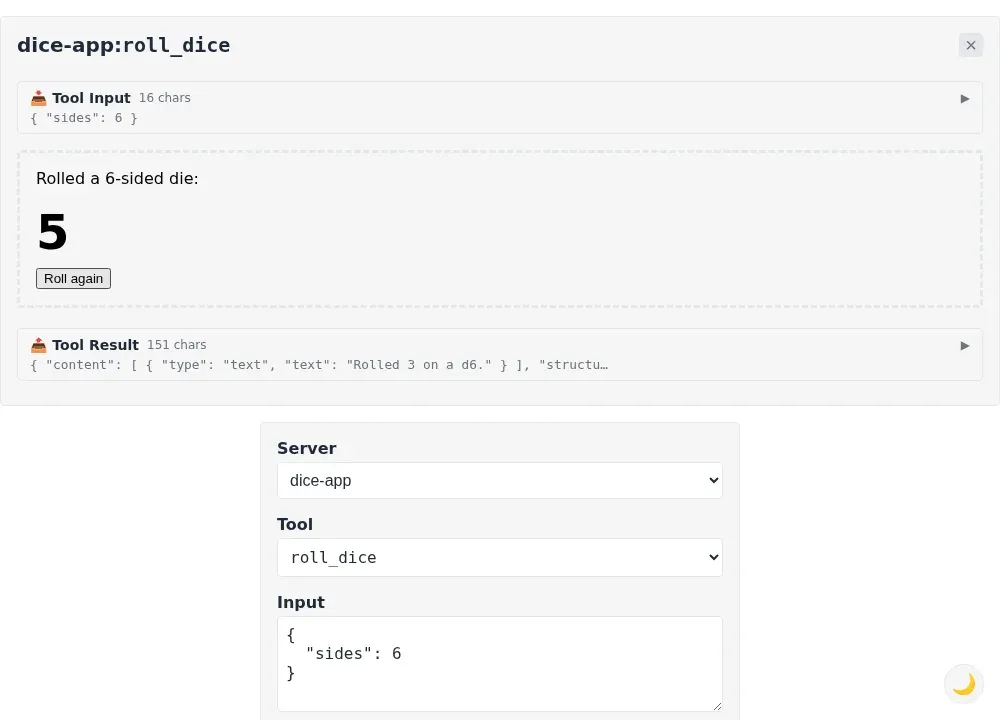
The View runs two iframes deep: an outer sandbox page on its own origin (port 8081) and an inner iframe with the View’s HTML. That is the sandbox-proxy pattern the spec requires for web hosts. Use SERVERS='["http://localhost:3002/mcp"]' to point basic-host at another URL. The repository’s npm start uses Bun to serve the pages.
Sources
MCPDev is community documentation. It is not affiliated with the Model Context Protocol project or with the vendors of the clients it covers.