Test a server with the MCP Inspector
- Spec
2026-07-28- Evidence
- E2Reproducedarm64
- MCP Inspector
@modelcontextprotocol/inspector@2.12.0- Verified
When a client says a server failed, you cannot tell whether the server is broken or the client is misconfigured. The Inspector removes the client: it starts or calls your server directly and shows every message.
Install and run
Section titled “Install and run”You do not install it. Run it with npx, pinned to a version:
npx -y @modelcontextprotocol/inspector@2.12.0 --helpVersion 2.12.0 declares Node.js 22.19 or later in its package metadata. We tested it on Node 24.21 only.
It has three front ends, chosen with the first argument:
| Flag | What you get |
|---|---|
--web (default) |
A browser UI with a message log |
--cli |
One command, one result. Good for scripts and CI |
--tui |
An interactive terminal UI |
The mode flag must come before everything else; the rest of the arguments are passed through unchanged.
In the terminal
Section titled “In the terminal”Use the CLI for quick checks. These commands work against any stdio server; replace node src/server.ts with your own command.
npx -y @modelcontextprotocol/inspector@2.12.0 --cli \ node src/server.ts --protocol-era auto --method tools/listnpx -y @modelcontextprotocol/inspector@2.12.0 --cli \ node src/server.ts --protocol-era auto \ --method tools/call --tool-name add --tool-arg a=2 b=3 --format jsonnpx -y @modelcontextprotocol/inspector@2.12.0 --cli \ http://127.0.0.1:8931/mcp --protocol-era auto --method tools/listThe transport is detected from the target: a command means stdio, a URL ending in /mcp means Streamable HTTP, and /sse means the old HTTP+SSE transport. Use --transport to override it.
If the call fails, the CLI prints {"error": …} and exits with a non-zero code, so you can use it in scripts.
In the browser
Section titled “In the browser”npx -y @modelcontextprotocol/inspector@2.12.0 --web \ --protocol-era auto node src/server.tsIt prints a local address with a one-time token, for example http://127.0.0.1:6274?MCP_INSPECTOR_API_TOKEN=…. Open that exact address, token included. It listens on 127.0.0.1 only, and MCP Apps are rendered in a separate sandbox on port 6275.
Because you started it with a command, the page says Read-only session: the server list cannot be edited. Turn on the switch on the server card to connect.
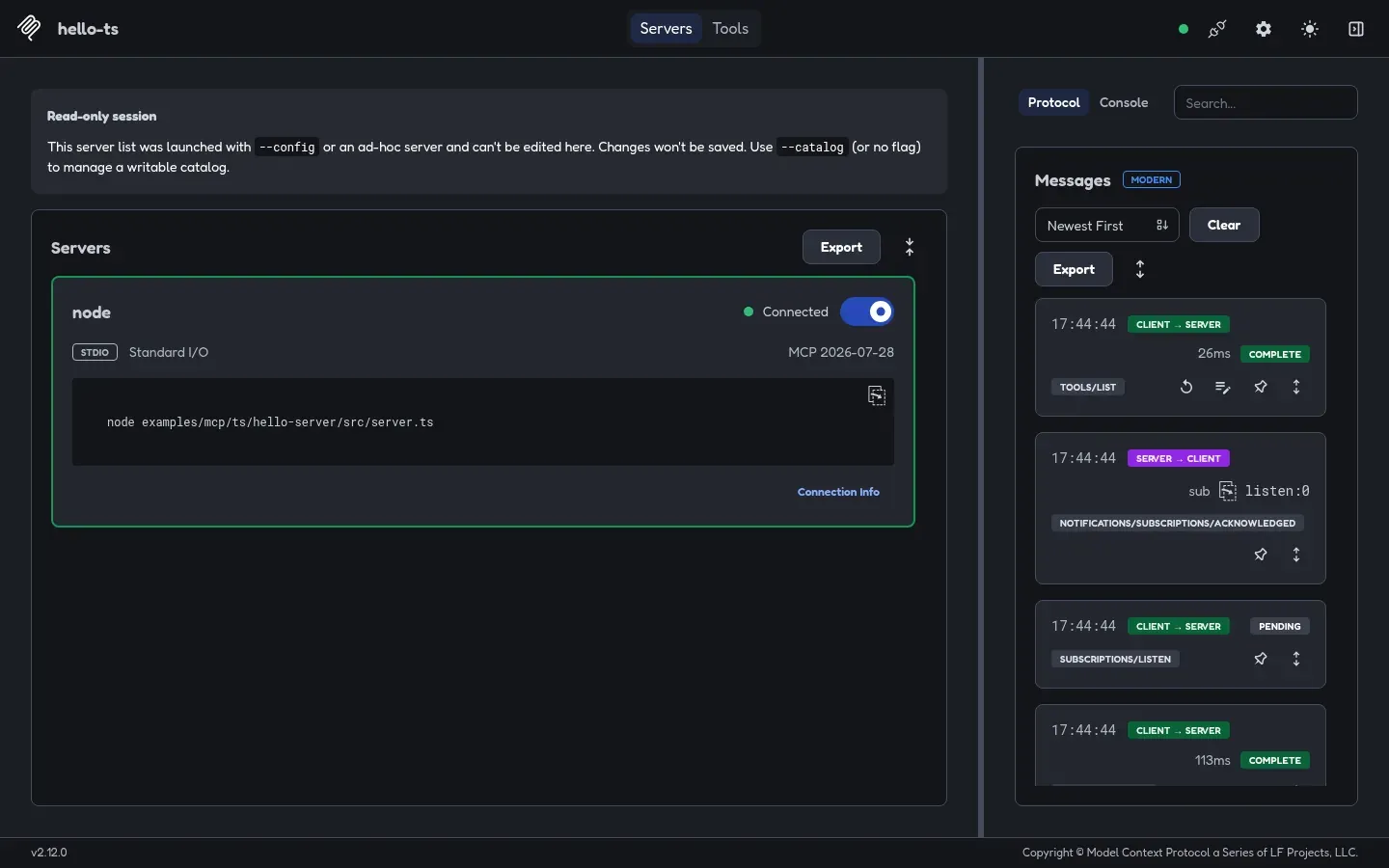
–protocol-era auto.Two things to read in the screenshot:
- The server card shows the negotiated version, here MCP 2026-07-28.
- The message panel is labeled MODERN, and you can see
subscriptions/listen, the 2026-07-28 way of receiving change notifications.
Open Tools at the top to call tools from a form.
Which protocol did I get?
Section titled “Which protocol did I get?”- In the CLI output, a result that carries
_metawithio.modelcontextprotocol/serverInfocame over 2026-07-28. Without it, the connection used the older handshake. - If
--protocol-era modernfails withVersion negotiation failed: the server did not offer pinned protocol version 2026-07-28, the server only supports older versions. In our tests this happens with the Java SDK 2.1.0.
On Linux without a keychain
Section titled “On Linux without a keychain”On a Linux machine with no desktop keychain, the Inspector warns that it stores secrets, such as OAuth tokens, unencrypted in ~/.mcp-inspector/secrets.json with file mode 0600. That is expected on servers and containers. Set MCP_INSPECTOR_SECRET_STORE to choose another store.
Sources
MCPDev is community documentation. It is not affiliated with the Model Context Protocol project or with the vendors of the clients it covers.